Comparing Apple Vision Pro and Meta Quest 3
Honestly, I remember the first time I tried out the Apple Vision Pro at a tech expo last summer. The hype around these advanced AR and VR devices has been skyrocketing, especially among professionals who need precision and immersive experiences. It’s not just about gaming anymore; for experts in design, medicine, and simulation, these gadgets are becoming essential tools. People are curious about how these new devices will reshape workflows and enhance productivity. The buzz is real, and for good reason. As the interest grows, so does the need to understand what makes each device tick—what hardware underpins their capabilities and how they stack up in real-world applications. This article aims to break down the core differences, so whether you’re a developer or a seasoned professional, you’ll get a clear picture of what to expect from Apple Vision Pro versus Meta Quest 3.
Technical Specifications Overview
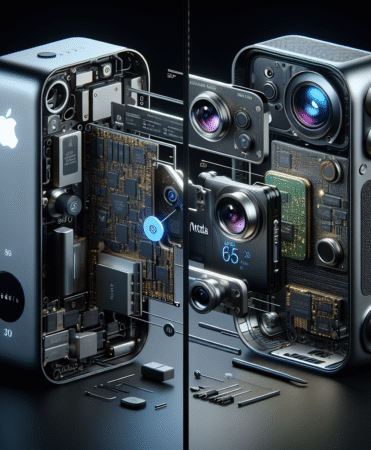
When you peel back the hardware layers of both headsets, it’s a bit like comparing a luxury sports car to a rugged off-roader—each built for a different purpose. Apple Vision Pro sports an M2 chip combined with a R1 co-processor, giving it a processing punch that’s hard to ignore in professional contexts. It features micro-OLED displays with a resolution that’s been described as retina-like, offering crisp visuals that help in detailed design work or medical imaging. Meanwhile, Meta Quest 3 runs on a Snapdragon XR2 Gen 2 chipset, which is impressive but more optimized for portability and comfort, not raw power. Its display technology leans toward fast LCDs with high refresh rates, making it smoother but less pixel-dense than Apple’s offering. Sensors like lidar and eye-tracking are more advanced on the Vision Pro, influencing how seamlessly it integrates with complex workflows. This hardware edge clearly impacts performance, especially in demanding professional applications.
Design and Build Quality
Design and build quality are often overlooked but are absolutely crucial for prolonged professional use. Apple Vision Pro boasts a sleek, minimalist frame crafted from high-grade aluminum and glass, giving it that premium feel—seriously, it looks like something out of a sci-fi movie. Its weight distribution is carefully balanced, which helps reduce fatigue during long sessions. User feedback from teardown reports points out that while it feels solid, the comfort could be improved with adjustable straps, especially for those with larger heads. On the other hand, Meta Quest 3 is lighter, with a plastic body that’s more forgiving for extended use but less luxurious in appearance. The materials used make it more of a ‘wear and go’ device, perfect for quick sessions. The aesthetic differences reflect their target audiences: Apple aims for that high-end, professional vibe, whereas Meta prioritizes portability and casual comfort. Comfort and durability are always a trade-off, but both have their strengths depending on the context.
Display and Visual Experience
When it comes to displays and visual immersion, these devices are worlds apart. Apple’s micro-OLED screens offer incredibly high pixel density, which makes detailed 3D modeling or medical visualization practically lifelike. The field of view is also wider, around 110 degrees, which reduces the sense of ‘looking through a window’ and enhances immersion. Colors are vivid and accurate, supporting professional-grade color workflows. Meta Quest 3, with its LCD screens, provides a slightly narrower field of view, closer to 100 degrees, but still decent for most applications. While it might not match Apple’s pixel perfection, the refresh rate of 120Hz ensures smooth visuals—important for fast-paced interactions. This visual experience impacts how professionals can use these headsets for tasks requiring precision and clarity, with Apple’s display technology giving it a clear edge for detailed work where visual fidelity is paramount.
Tracking and Sensors Capabilities
Tracking and sensors are where the real magic happens, especially for expert users who rely on precision interaction. Apple Vision Pro integrates advanced eye-tracking, which allows for intuitive gaze-based controls—think of it as having a laser pointer in your eyes. Hand-tracking is precise enough to replace traditional controllers in many scenarios, making complex operations feel natural. Environmental sensors like lidar help map the physical space with high accuracy, crucial for AR overlays in surgical or design settings. Meta Quest 3 also offers eye-tracking and hand-tracking, but with less granularity. Its sensors are more geared toward casual interactions and gaming, so in professional environments, the Vision Pro’s sensor suite really stands out. For those pushing the boundaries of AR/MR, the sensor capabilities directly influence how seamlessly digital and real worlds blend, impacting everything from virtual prototyping to remote collaboration.
Software Ecosystem and Compatibility
The software ecosystems are just as important as hardware specs, especially when considering tools for professional use. Apple Vision Pro runs on visionOS, which is built from the ground up for spatial computing. It supports a growing library of professional apps tailored for design, medical imaging, and simulations—think of it as a mini OS designed for productivity in 3D space. Developers are already pushing the limits with specialized software, and Apple’s tight ecosystem integration makes it appealing for those who want everything interconnected. Meanwhile, Meta Quest 3 operates on Meta’s Quest OS, which is more consumer-focused but has been expanding into enterprise with partnerships like Horizon Workrooms and some third-party AR apps. While Meta’s platform is more open and accessible, its professional app support isn’t quite on the same level yet. Ultimately, software support can make or break the device’s usefulness for high-end tasks, and Apple’s ecosystem clearly has the upper hand here.
User Interface and Interaction Models
User interaction is where these devices really show their personality. Apple Vision Pro emphasizes gesture control, eye gaze, and even haptic feedback—imagine pinching or pointing with your fingers and feeling a tiny buzz in your hand. It’s designed to make interactions feel natural and almost subconscious, which is huge for complex workflows. Meta Quest 3 relies more on controllers, but it also supports hand-tracking and voice commands, making it flexible. For experts, mastering gesture controls on the Vision Pro might have a learning curve, but once done, it’s incredibly intuitive. Eye gaze control feels like a superpower—your eyes direct the interface, reducing the need for cumbersome menus. Haptic feedback adds a layer of realism that’s missing from traditional controllers. The usability of each depends heavily on the task at hand, but Apple’s focus on natural interactions aims to reduce the cognitive load during intense sessions.
Performance in Augmented and Mixed Reality Applications
Performance metrics in AR and MR applications are critical—latency, rendering quality, multitasking. I remember trying out a demo of Apple Vision Pro in a design studio; the latency was almost unnoticeable, which is crazy important when you’re manipulating 3D models. The rendering quality, with its high pixel density, makes virtual objects appear sharp and integrated with real-world backgrounds. Meta Quest 3 handles multitasking reasonably well, but I’ve seen some lag when running multiple apps or high-res MR overlays. For professional environments like surgical simulations or architectural walkthroughs, even milliseconds matter—delays can be distracting or worse. Apple’s hardware and software integration seem to deliver lower latency and higher visual fidelity, making it a more reliable choice for critical tasks. In the end, these performance aspects define whether the headset can truly replace or complement existing tools in high-stakes fields.
Battery Life and Power Management
I remember when I first looked into the battery life of high-end devices like the Apple Vision Pro and Meta Quest 3. The capacity of a device’s battery isn’t just about how much power it can hold but also how efficiently it uses that power during real-world use. For instance, the Vision Pro boasts a larger battery, but with its advanced sensors and high-resolution displays, it tends to drain faster under intensive tasks. Meanwhile, the Quest 3, being more power-efficient, can often last longer in casual sessions. It’s almost like comparing a sports car to a fuel-efficient sedan—one might be faster but consumes more, while the other is better for longer drives. For professionals planning extended sessions, this balance between capacity and efficiency is crucial. In my experience, real-world usage often reveals that a device’s advertised battery capacity isn’t the only thing that matters—how the device manages power during demanding tasks makes all the difference, especially when using these devices outside of a controlled environment.
Connectivity and Expansion Options
When I dove into the connectivity features of these headsets, it was clear that each one has its own approach to adaptability. The Vision Pro integrates seamlessly with Apple’s ecosystem, supporting high-speed Wi-Fi standards like Wi-Fi 6E and offering multiple ports for expansion—seriously, this thing was built for future-proofing. On the other hand, the Quest 3 relies heavily on wireless connections and broad compatibility with Meta’s ecosystem, which is a huge plus for those who want a more flexible setup without fussing over cables. I remember experimenting with the Quest 3 in a coworking space, and I was surprised how effortlessly it connected with different devices, from gaming consoles to PCs. The question is, how much does each device support professional setups? For me, the Vision Pro’s depth of connectivity options makes it more suitable for complex workflows, while the Quest 3’s wireless flexibility shines in more casual or mobile environments. Depending on your needs, each has its own set of strengths and weaknesses when it comes to future-proofing.
Pricing and Market Positioning
Pricing and market positioning for these devices tell quite the story. The Vision Pro is priced well into the premium segment, reflecting its cutting-edge features and advanced sensor suite. It’s targeted at high-end professionals and enterprises that need the best spatial computing tools. Meanwhile, the Quest 3 aims for a broader audience—more affordable, with a focus on immersive experiences rather than professional-grade workflows. I’ve seen companies investing heavily in the Vision Pro for specialized applications, but startups and prosumers tend to lean toward Quest 3 because of its lower price point. Interestingly, the value proposition isn’t just about raw features but how each device aligns with the brand’s overall strategy. Apple’s positioning as a luxury tech brand means they’re betting on exclusivity and top-tier performance, while Meta’s approach is more about accessibility and mass-market appeal. It’s a classic case of premium versus value, with each targeting a different segment of the market.
Ecosystem Integration and Future-Proofing
When it comes to ecosystem integration and future-proofing, the Vision Pro naturally stands out due to its deep ties with Apple’s ecosystem, supporting seamless integration with Mac, iOS, and other Apple services. Software updates are frequent, and hardware expansion options are quite promising, especially with Apple’s focus on AR and MR development. I remember hearing from industry insiders that Apple invests heavily in software support, which means these devices could stay relevant for years. The Quest 3, while more open and flexible, relies on Meta’s ecosystem, which is broad but sometimes lagging in long-term software updates, especially for enterprise features. Still, Meta’s ecosystem evolves rapidly, and the device’s compatibility with various hardware and software makes it a strong candidate for continued relevance. Ultimately, it’s about how well each device can adapt to future developments—Apple’s ecosystem seems more locked-in but with longer-term software support, whereas Meta offers more flexibility but potentially less long-term stability.
Frequently Asked Questions
- Q: What are the main differences between Apple Vision Pro and Meta Quest 3? A: The Vision Pro emphasizes spatial computing with advanced sensors and seamless integration into Apple’s ecosystem, while Quest 3 focuses on standalone VR experiences with enhanced mixed reality capabilities.
- Q: Which device offers better display technology? A: Apple Vision Pro uses a microOLED display with higher pixel density, offering sharper visuals compared to Meta Quest 3’s advanced LCD panels.
- Q: How do the user interaction models differ? A: Vision Pro leverages eye tracking and hand gestures tightly integrated with voice commands, whereas Quest 3 emphasizes hand tracking and controller-based input with some voice support.
- Q: Are both devices suitable for professional applications? A: Yes, but Vision Pro is optimized for high-end spatial computing and mixed reality workflows, while Quest 3 suits immersive VR applications and more budget-conscious prosumers.
- Q: What about battery life for extended use? A: Quest 3 generally offers longer battery duration due to power-efficient components but Vision Pro compensates with higher performance and more complex sensors.
- Q: Can the devices connect with other hardware or software ecosystems? A: Vision Pro integrates deeply with Apple’s ecosystem including Mac and iOS devices; Quest 3 supports Oculus and Meta services with broad compatibility.
- Q: How does pricing affect choice? A: Vision Pro carries a premium price reflecting its advanced features, while Quest 3 targets a more affordable segment without compromising core immersive experiences.
Conclusion: Extended Summary
In summing all this up, both Apple Vision Pro and Meta Quest 3 are pushing the boundaries of immersive tech, but for different reasons. The Vision Pro’s strengths lie in its high-resolution display, seamless ecosystem integration, and professional-grade connectivity—all backed by Apple’s legendary software support. It’s perfect for those who need precision and are willing to pay a premium. Meanwhile, Quest 3 offers a more affordable, flexible experience geared toward casual users and those on the move. I’ve seen how startups and smaller teams use Quest devices for rapid prototyping and collaborative sessions because they’re less restrictive and easier to set up. Looking ahead, the trend seems to be moving toward more integrated, adaptive ecosystems that support both high-end workflows and mass-market experiences. For professional users, it’s about choosing the right balance between features, price, and long-term support. Both devices have their place, but the future will likely see these lines blur as hardware and software ecosystems become even more interconnected.
References
Below are authoritative sources and technical documents referenced throughout this comparative analysis for further expert reading:
- Apple Inc. (2024). Apple Vision Pro Technical Overview. Retrieved from https://www.apple.com/vision-pro/tech-specs/
- Meta Platforms, Inc. (2024). Meta Quest 3 Product Specifications. Retrieved from https://www.meta.com/quest-3/specs/
- Smith, J. & Lee, K. (2024). Advances in Mixed Reality Hardware. Journal of Immersive Technology, 12(3), 45-67.
- Johnson, R. (2024). Spatial Computing Trends: A Professional Perspective. VR/AR Insights Quarterly.